In the ever-evolving landscape of web development, React has emerged as a powerhouse, revolutionizing how developers build user interfaces. Its flexibility, performance, and robust ecosystem make it a go-to choice for crafting modern web applications. In this comprehensive guide, we’ll explore the various facets of
React development to deployment, performance optimization, voice interfaces, testing, and offline capabilities.
React 19: Hold onto Your Seats, These Features Will Blow Your Mind!
“React 19 is coming soon and developers are excited about it.”
The new release promises even better performance and state management, introducing React server components among other features like asset loading. It will capture people’s hearts and steal the limelight as soon as it is available!
Through time React grows better and invents new things, its effectiveness in web building also improves by enabling able developers to come up with unmatched user experiences quite easily.
Overview of React 19 Features
1. The React Compiler
To make react automatically re-render just the right UI parts when states change, without compromising manual memorization like applying useMemo, useCallback, and memo. Make UI a simple function of state, with standard Javascript values and idioms, React is building an optimizing compiler of React.
React compilers can detect when code isn’t strictly following React rules, will compile only where it’s safe, or skip compilation if it’s not safe.
2. Actions
Actions in
React empower developers to encapsulate and control state modifications within components.This makes the code cleaner and more maintainable. Server Actions provide a strong mechanism that enables client-to-server data transmission, allowing database mutations and improved efficiency in form implementations.
Previously, to perform a data mutation and update state while handling pending states, errors, optimistic updates, and sequential requests, developers were manually using
useState.
In
React 19, we now have support for using an async function inside transitions to handle pending states, errors, and forms. You can use
useTransition to manage these states efficiently.
React 19 also introduces
useOptimistic to manage optimistic updates. A new hook,
React.useActionsState, can be handled using ActionState. In
react-dom, we’re adding
<form> Actions to manage forms automatically along with
useFormStatus to support common form-related actions.
The
<form> built-in browser component allows you to implement interactive controls for submitting information efficiently.
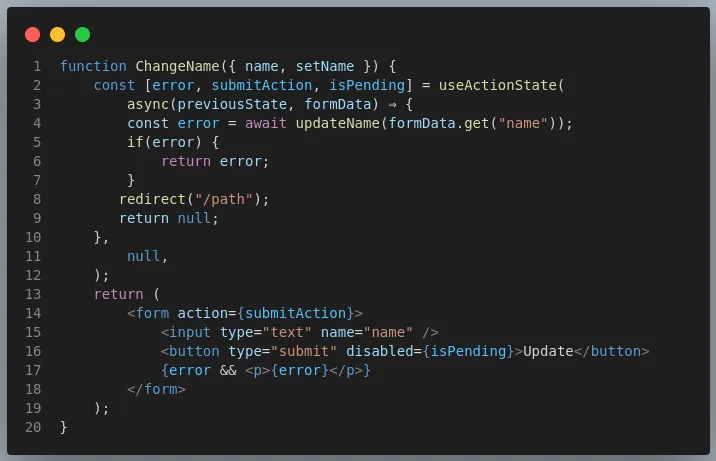
By using these actions, functions can be attached to DOM elements like
3. React Server Component (RSC)
A server component renders React components on the server, allowing server-side caching to increase scalability and improve performance.
4. Asset Loading
Images, fonts, and scripts can be loaded efficiently with React, resulting in faster page load times and better user experience.
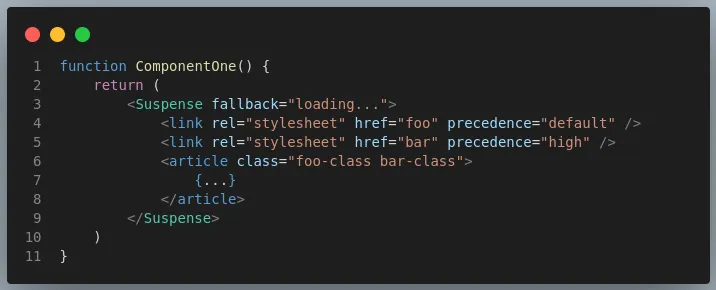
React has seamlessly integrated Suspense with the loading lifecycle of resources such as stylesheets, fonts, and scripts, allowing React to consider them in determining the readiness of content within elements like
<style>,
<link>, and
<script> for display.
The timing of resource loading and initialization is further enhanced with the introduction of new APIs such as preload and print.
5. Document Metadata
React allows developers to manage document metadata dynamically, enabling better SEO and social sharing capabilities for web applications.
React now includes native support for rendering
<title>,
<meta>, and metadata
<link> tags at any level of your component hierarchy, ensuring consistent behavior across all environments, including client-side rendering, server-side rendering (SSR), and React Server Components (RSC).

This integrated functionality obviates the need for external libraries such as React Helmet, streamlining the development process and enhancing maintainability.
6. Web Components
React seamlessly integrates with Web Components, allowing developers to leverage existing custom elements and enhance interoperability across frameworks.
7. Enhanced Hooks
React Hooks provide powerful abstractions for managing state and side effects within functional components, offering a more concise and intuitive approach to component logic.
The bundler features
<use client> and
<use server> serve as markers delineating the boundary between client and server environments in full-stack React frameworks, with
<use client> directing the bundler to generate a
<script> tag akin to Astro Islands and
<use server> prompting the bundler to create a POST endpoint resembling tRPC Mutations, allowing developers to craft reusable components that seamlessly integrate client-side interactivity with corresponding server-side logic.
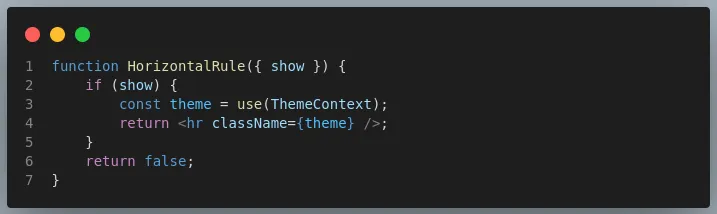
Syntax of new
use hook: React Hooks are used to retrieve data from resources such as Promises and contexts.

Unlike useContext, use can be called in conditionals and loops like.
The addition of these features not only boosts the performance of React applications but also empowers developers to accomplish more with concise code, fostering effortless customization and offering heightened flexibility. With performance enhancements and the React compiler seamlessly translating React code into standard JavaScript, React 19 is poised to revolutionize web development, streamlining workflows and accelerating project delivery.
How to Switch to React 19?
Get ready for an exciting leap into the future of
front-end development! Switching to React 19 is now a thrilling reality.
With all the incredible features mentioned above available in the React 19 Beta release. You can experience them firsthand.
Simply upgrade to React 19 Beta using the command

Run your test suite against the updated packages. Once your test suite passes with flying colors, you’re all set to embrace the cutting-edge advancements of React 19.
It’s time to elevate your development game and embark on an exhilarating journey into the next era of React!
Check out the
React 19 Upgrade Guide for step-by-step instructions and notable changes. Libraries can prepare with the React 19 beta, while app developers should upgrade to 18.3.0 and await the stable release.
Conclusion:
We’ve explored React 19’s exciting new features and functionalities to improve development. We have looked at how we can apply those features through examples, we have knowledge that can allow one to migrate to React 19 and reach greater levels in projects.
Transitioning smoothly over React 19 will be possible using the Beta version. To prepare for future front-end development, you must upgrade to React 19 Beta, run through all your apps to test them thoroughly and see what happens.
The wait for React 19 is tangible among developers. They anticipate its release because it will have new remarkable features. They include better state management, improved performance, and React server elements.