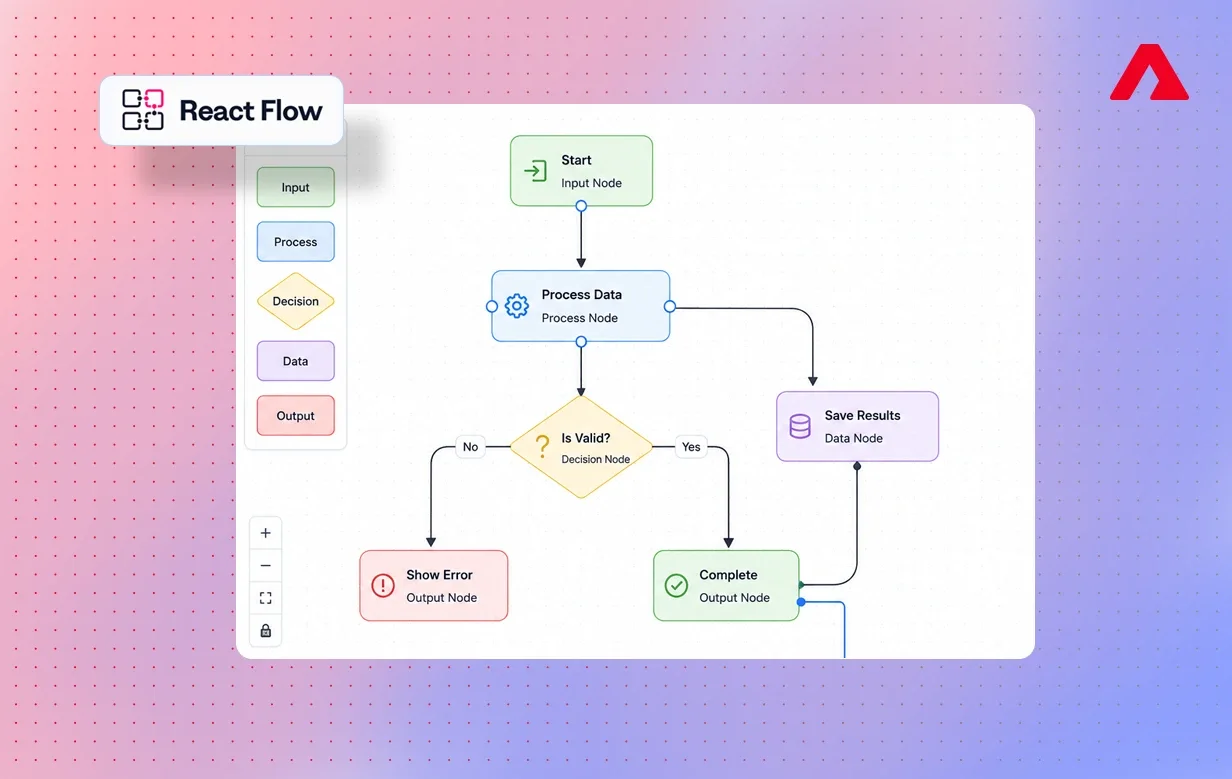
Modern SaaS platforms increasingly rely on visual workflow systems to simplify automation, approvals, onboarding, and operational processes. From AI tools to internal admin platforms, businesses now expect interactive interfaces that make complex logic easier to manage.
React Flow has emerged as one of the most popular libraries for building node-based editors and workflow-driven applications in React. Its flexibility, performance, and customization capabilities make it ideal for automation builders, CRM systems, low-code platforms, and enterprise workflow tools.
React Flow also makes a good visual planning layer for mobile apps. This walks you through all the concepts you need, up to and including advanced techniques, so that you can build fun, interactive things without hesitation.
What is React Flow?
React Flow is an open-source library for building node-based graphs as a React component. It helps developers create customizable, scratch-pad-style diagrams using draggable nodes and edges.
Key features include a built-in drag-and-drop system, flexible CSS-based styling, rich event handling, and strong abstraction that removes most low-level complexity. It transforms logic structures into human-readable visual diagrams for developers, product managers, and CTOs alike.
The library is widely used in CRM systems, automation tools, low-code platforms, SaaS dashboards, internal enterprise apps, and mobile workflow planning. Its simplicity is why teams offering React Native development services often rely on React Flow during planning phases to map navigation logic and screen transitions visually.
Why Businesses Need Visual Workflow Systems
Visual workflow systems have become a core part of how modern businesses plan, build, and scale their products. Here is why teams across industries are moving toward visual-first tools like React Flow.
- Faster Prototyping and Development React Flow saves time by providing simple, configurable components that require minimal setup. Teams can rapidly prototype and test logic before committing it to production. This allows for faster iterations and better coordination among teams in the early stages of development.
- Teams Work Better Together With visual workflows built in React Flow, designers, product managers, and developers share a common visual language. Teams do not have to read long documents or search through code snippets. They can review diagrams together as soon as they are available, which leads to fewer misunderstandings and smoother development.
- Better Debugging and Workflow Clarity React Flow transforms code into clear, readable visual maps, making it easy to spot errors, broken links, or weak logic. Developers can follow the flow step by step, find bottlenecks, and fix logic right away. This clarity often leads to cleaner architecture and more reliable final applications.
Key Features of React Flow
React Flow makes workflow creation, editing, and management easy with its wide feature set. Here are the key features of React Flow.
- Pre-Built Node and Edge Components React Flow includes ready-made nodes, edges, and connection handles that work instantly without any manual setup. These components remove the need to design UI elements from scratch, saving developers significant time during early development. With a solid foundation already built in, teams can focus more on logic, user experience, and overall workflow behavior.
- Smooth Interactions: Zoom, Pan and Drag React Flow provides smooth zoom and pan, along with friendly drag-and-drop interactions, making even the most complex layouts easy to explore. It allows teams to work across large workflow maps without running into performance problems. This smooth interaction layer helps enterprise teams manage thousands of nodes with clear visibility and precision.
- Hooks-Based State Management React Flow provides dedicated hooks, such as useNodesState and useEdgesState, that enable clean, controlled state management for all workflow elements. These hooks track changes, trigger UI updates, and keep everything running in real time while users interact with the canvas. This keeps your workflow editor stable, predictable, and easy to maintain as it grows in complexity.
- Full Customization and Extensibility Developers can create custom node types with styles, behaviors, and interactive controls that support unique business logic. Whether you need special icons, detailed UI structures, or animated elements, React Flow's open API makes it possible. This flexibility is ideal for SaaS products and enterprises that need branded, high-quality visual workflow experiences.
- Built for Enterprise-Grade Workflows React Flow is built to support workflows of significant size and complexity. It provides real-time data updates, smart rendering, and high-performance interactivity suited for enterprise applications. This makes it a reliable solution for CRM platforms, automation tools, and internal systems handling thousands of connections.
Real Business Use Cases
React Flow is flexible enough to support a wide range of industries and product types. Its adaptability makes it suitable for any application that requires structured processes or interactive visualization of logic.
- Workflow Automation Tools React Flow is most commonly used in automation editors, where users have a visual interface to build flows made up of Triggers, Actions, and Conditions. The platform enables non-coders to design complex task scripts without writing any code. This visual-first experience is common across many leading low-code and no-code platforms.
- CRM and SaaS Dashboards React Flow can be used to visualize CRMs and SaaS dashboards by mapping customer pipelines, process flows, and structured workflows. Teams can track activities, workflow changes, and performance in real time using easy-to-read diagrams, customizable element ordering, and dynamic layouts.
- App Onboarding and Navigation Flows React Flow helps product teams map onboarding journeys, screen transitions, and navigation logic for mobile and web applications. This visual planning is especially useful in React Native app development, where multiple screens and logic paths need to be coordinated. It improves both user experience and overall app structure.
- Logic Builders and Decision Trees Decision-making platforms use React Flow to build conditional workflows, where each path represents a possible user action. By visualizing branching logic, teams can test scenarios, preview outcomes, and refine the accuracy of their flows. This is important for AI tools, financial systems, and enterprise rule engines.
Technical Architecture Considerations
Before building with React Flow, it helps to understand how it fits into your app's technical setup.
React Flow works as a React component, which means it plugs directly into any React project without heavy configuration. It uses a virtual canvas for rendering nodes and edges, which keeps the app fast even when handling many elements at once.
State is managed through hooks, making it straightforward to sync workflow data with your existing app logic. React Flow also connects smoothly with REST APIs, allowing workflows to be saved, loaded, and updated in real time.
For teams building on top of React Native, React Flow can serve as a planning and prototyping layer in web-based internal tools before any mobile code is written. This helps teams organize screen logic and reduce rework during development.
Building Scalable Workflow Editors
Building a production-ready workflow editor involves much more than simply connecting nodes and edges. Modern workflow-based applications must support real-time interactions, scalable rendering, flexible customization, and seamless integration with backend systems.
React Flow provides a strong foundation for creating these kinds of workflow-driven experiences in React applications.
1. Designing Flexible Node-Based Architectures
Scalable workflow systems begin with a well-structured node architecture. Each node typically represents a business action, approval step, condition, automation trigger, or system event.
React Flow allows development teams to create custom node types with unique layouts, controls, icons, and behaviors tailored to specific business requirements. This flexibility makes it possible to build highly interactive editors for:
- automation platforms,
- internal operational tools,
- AI workflow systems,
- onboarding flows,
- and low-code applications.
A modular node architecture also makes workflows easier to maintain as business logic evolves.
2. Managing Workflow State Efficiently
As workflows grow in complexity, state management becomes increasingly important. Workflow editors often need to track:
- node positions,
- edge connections,
- user interactions,
- validation states,
- and real-time updates.
React Flow simplifies this process through hooks like:
- useNodesState
- useEdgesState
For larger applications, teams commonly combine React Flow with state management libraries such as Zustand to maintain predictable, scalable application behavior.
Efficient state handling helps ensure the workflow editor remains responsive even when managing hundreds or thousands of nodes.
3. Optimizing Performance for Large Workflows
Enterprise workflow systems often contain large node graphs with complex relationships and dynamic updates. Without proper optimization, rendering performance can quickly degrade.
React Flow supports efficient rendering patterns that help maintain smooth interactions across large workflows. Features such as viewport controls, selective rendering, and controlled updates help improve responsiveness and usability.
Development teams also commonly implement:
- memoization,
- lazy loading,
- graph normalization,
- and optimized event handling
to improve performance in large-scale applications.
4. Creating Interactive User Experiences
Modern workflow platforms require more than static diagrams. Users expect intuitive, highly interactive interfaces that allow them to visually manage complex processes with minimal friction.
React Flow supports rich interactions such as:
- drag-and-drop editing,
- dynamic edge creation,
- zooming and panning,
- multi-node selection,
- and real-time node updates.
Additional built-in features like:
- MiniMap,
- Controls,
- Background,
- and custom edge rendering
help create polished workflow experiences that feel modern and easy to navigate.
5. Integrating with APIs and Backend Systems
Most production workflow editors must connect with backend services to save workflows, sync changes, and execute automation logic.
React Flow integrates smoothly with:
- REST APIs,
- GraphQL services,
- WebSocket connections,
- and real-time databases.
This allows businesses to:
- persist workflow configurations,
- monitor live process updates,
- enable collaborative editing,
- and build dynamic automation systems that respond instantly to user actions.
Workflow data can also be serialized and stored as JSON, making it easier to manage versioning, imports, exports, and long-term data persistence.
6. Building Enterprise-Ready Workflow Platforms
Scalable workflow applications often require advanced capabilities beyond basic node editing. Enterprise systems may include:
- role-based permissions,
- workflow validation,
- audit tracking,
- conditional branching,
- approval chains,
- and AI-assisted automation logic.
React Flow provides the flexibility needed to support these advanced use cases while maintaining a clean and interactive user experience.
For businesses building workflow-heavy SaaS platforms, internal systems, or automation products, investing in scalable workflow architecture can significantly improve operational efficiency and reduce manual processes across teams.
Advanced React Flow Capabilities
React Flow supports advanced capabilities that allow teams to build professional, large-scale workflow systems. These features provide deeper customization and enterprise-level functionality.
- Dynamic Node Rendering Dynamic rendering enables nodes to update their appearance or behavior when data changes or users interact with them. This allows for rich UI experiences where tasks reflect real-time status. It is especially useful for monitoring dashboards and automation engines.
- Conditional Logic and Branching React Flow supports branching workflows that route users through different paths based on set conditions. This is important for modeling approval logic, onboarding flows, or rule-based engines. It enables accurate simulation of multi-path user journeys.
- API and Database Integration React Flow connects smoothly with backend APIs, enabling workflows to sync with real-time data. Teams can load user-created flows, update nodes dynamically, or save system changes right away. This creates a fully connected, enterprise-ready workflow experience.
- Mobile Workflow Planning for React Native React Flow helps engineering teams design mobile navigation flows, conditional screens, and onboarding paths visually before writing any mobile code. This reduces iteration time in React Native app development and improves app structure. It ensures mobile logic is organized and well thought out before implementation begins.
Why Choose Atharva System for Workflow-Driven React and React Native Development?
At Atharva System, we help businesses build scalable, workflow-focused applications using modern React technologies, including React Flow and React Native.
Our team has experience developing:
- workflow automation platforms,
- internal business tools,
- SaaS dashboards,
- approval systems,
- onboarding flows,
- and interactive enterprise applications.
We focus on building applications that simplify complex business logic through intuitive, visual user experiences.
Expertise in Workflow-Based Product Development
Modern applications often require more than standard user interfaces. Businesses increasingly need:
- visual workflow builders,
- automation engines,
- conditional logic systems,
- and real-time operational dashboards.
Our development team understands how to architect scalable node-based systems that remain flexible, maintainable, and performant as products evolve.
From custom workflow editors to enterprise automation tools, we help businesses design systems that improve operational efficiency and reduce manual processes.
Conclusion
React Flow has become one of the most powerful libraries for building smart, scalable, and visually clear workflow editors with React. It is flexible in structure and highly interactive, supporting real-time user actions like clicks, drags, and connections through web controls.
Developers can build their own custom node types, making it easy to replace static displays with dynamic, branded elements. React Flow provides the tools for automation platforms, SaaS dashboards, and enterprise workflow engines, giving development teams clear control over complex logic.
In mobile development with React Native, visualizing navigation flows and user experiences with React Flow helps cut development time and reduce rework. If you are looking for a trusted React Native app development company to build your workflow-driven mobile or web application, our team's skills in React Flow and React Native can take your product from idea to deployment with confidence.
FAQs
1. Is React Flow suitable for beginners?
Yes, React Flow is approachable as long as you are comfortable with basic React concepts. It provides clear documentation, sensible defaults, and ready-made components to get a visual workflow up and running right away.
2. Can I use React Flow with React Native projects?
React Flow itself runs in web-based React applications, but it is very helpful for planning and visualizing flows for React Native apps. Many teams use React Flow in internal tools to design navigation, onboarding, and decision logic before implementing them in React Native app development projects. This visual planning reduces rework and improves mobile architecture.
3. Is React Flow suitable for enterprise-grade applications?
Yes, many enterprise SaaS, CRM, and automation tools use React Flow, along with internal business systems. It scales well, handles complex branching, and supports real-time updates. It is also well suited for organizing logic in a structured way, which makes it easier for a react native development company or product team to manage workflows as their product grows.
4. How does React Flow support React Native Development Services and teams?
Developers, architects, and product owners can map user journeys, screen transitions, and conditional flows before writing any mobile code. This helps React Native app developers build well-structured, predictable apps with fewer surprises during development.