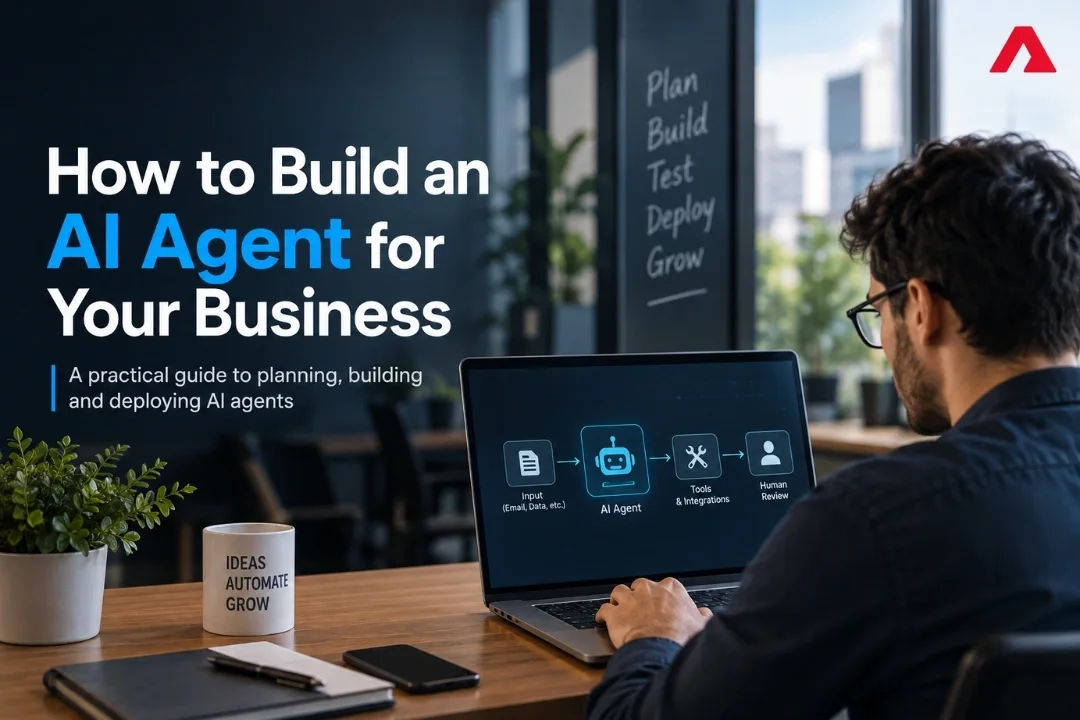
Building an AI agent means designing software that can understand a business goal, reason over available information, use approved tools and APIs, take actions within defined permissions, and escalate decisions to a human when required.
The engineering challenge is not simply connecting an LLM to your application. A production-ready AI agent requires a well-designed workflow, reliable tools and integrations, clear permissions, relevant business knowledge, evaluation methods, guardrails, human approval points, and continuous monitoring.
A logistics client described the problem better than any analyst report. Two coordinators spent most of their day reading booking emails, checking rates in one system, checking availability in another, and entering the same information into a third. Nobody was thinking. Everyone was copying.
When we asked what would happen if volumes doubled, the answer was simple: hire two more people.
That is the kind of workflow where an AI agent can create measurable value. Instead of a chatbot that only answers questions, an AI agent can read the incoming email, retrieve information from approved systems, prepare the booking, and ask a human to review or approve it before anything important happens.
The interest in this technology is growing quickly. Gartner’s 2026 Hype Cycle reports that 17 percent of organizations have already deployed AI agents, while 60 percent expect to do so within two years. Yet there is still a significant gap between wanting to use AI agents and successfully operating them in a real business environment.
This guide explains how to close that gap. You will learn what an AI agent is, which business processes are best suited for agents, how the underlying architecture works, how to build an AI agent step by step, what development can cost, which security controls are essential, and how to move from an initial idea to a production pilot in 90 days.
What an AI Agent Actually Is, and What It Is Not
The word “agent” gets used for three very different things, so let us be precise.
A chatbot answers. You ask a question, it replies with text. Nothing changes in your systems.
Traditional automation follows fixed rules. If the invoice arrives, move it to this folder. It is reliable and blind. Change the input format slightly and it breaks.
An AI agent is given an objective along with instructions, tools, permissions, and constraints, rather than having every execution step predetermined. It can determine which permitted actions to take based on the current context, use approved tools and systems, and escalate cases it cannot safely resolve to a human.
Here is the practical comparison.
| Factor | LLM | Chatbot | Rule-Based Automation | AI Agent |
|---|---|---|---|---|
| Input it handles | Text, documents, structured prompts | Typed questions and conversations | Fixed, structured triggers | Variable or unstructured inputs: email, PDFs, chat, forms, API responses |
| How it decides | Generates responses based on context and learned patterns | Retrieves or generates an answer | Follows preset rules | Determines permitted actions based on the objective, context, and constraints |
| Touches your systems | No, unless connected to tools | Rarely | Yes, through fixed workflows | Yes, through defined tools, APIs, and permissions |
| Handles exceptions | Can reason about unfamiliar inputs but does not act by itself | Usually limited to answering or escalating | Usually stops or fails when rules do not cover the case | Can adapt within defined limits or escalate to a human |
| Setup effort | Low | Low | Medium | Medium to high |
| Best for | Generating, summarizing, extracting, and reasoning over information | Answering questions and conversational support | Stable, repetitive processes with predictable rules | Multi-step workflows requiring context, tool use, and controlled decision-making |
| Main risk | Incorrect or unsupported outputs | Incorrect answers or poor responses | Silent failure on edge cases | Incorrect actions at scale if permissions and guardrails are poorly designed |
That last row matters most. A chatbot that is wrong wastes a minute. An agent that is wrong can send fifty incorrect purchase orders before anyone notices. This is why the security section below is not optional reading.
If your need is really conversational, a focused chatbot development project is cheaper and faster. If your need is work that crosses systems, you want an agent.
Where AI Agents Pay Off First
The best first agent is boring, high volume, and currently done by a person who copies information between screens. Look for work where the rules are mostly known, the exceptions are visible, and a mistake is recoverable.
Here is where we see the strongest early returns by function.
| Function | Agent Task | Why It Works Early | Typical Payback Signal |
|---|---|---|---|
| Order management | Read purchase orders and emails, match items and prices, create draft orders | High volume, clear source of truth in the ERP | Hours saved per week, fewer order errors |
| Finance and receivables | Track overdue invoices, send reminders, answer statement queries, flag disputes | Repetitive, rules are known, low creative content | Days of sales outstanding, collection hours |
| Customer support | Classify tickets, answer routine ones, route the rest with full context | Volume is high and answers exist in a knowledge base | First response time, deflection rate |
| Procurement | Watch stock levels, draft purchase orders, request approval above a value | Clear thresholds, easy human checkpoint | Stockouts avoided, buyer hours saved |
| Sales operations | Enrich leads, update CRM records, prepare quote drafts | Data entry heavy, low risk if reviewed | Rep hours returned to selling |
| IT and operations | Triage alerts, gather diagnostics, prepare the fix for approval | Repeatable diagnosis steps | Mean time to respond |
By industry, the same pattern repeats with different labels. Manufacturers start with quotation and order intake. Distributors start with stock and reorder work. Healthcare providers start with document handling and internal knowledge lookups, never with clinical decisions. Logistics companies start with booking and proof of delivery. Retailers start with catalog and support work.
Notice what is missing from this list: anything where being wrong is expensive and hard to reverse. Pricing decisions, credit approvals, clinical advice, and legal commitments belong behind a human, at least for your first year.
AI Agent Architecture: How an AI Agent Works
You do not need to write the code, but you should understand the parts, because every cost and every risk sits in one of them.
The trigger. Something starts the agent: a new email, a scheduled run, a record created in your ERP, a message in a queue.
The model. This is the reasoning part. It reads the input and decides what to do next. Most business agents call a hosted model through an API rather than running one in-house.
The tools. These are the specific actions the agent may take: read stock, create a draft order, send an email, look up a customer. Each tool is a controlled connection to one of your systems, usually through your existing APIs and microservices. Tool design is where most engineering effort goes, and where permissions live.
The knowledge. Retrieval gives the agent access to relevant policies, product data, records, documents, or past cases. Depending on the system, this may involve APIs, database queries, keyword or vector search, hybrid retrieval, or other knowledge-access mechanisms.
The memory. What the agent remembers within a task, and across tasks. Keep this deliberately small at first. Long memory adds cost and unpredictability.
The guardrails. Limits on what the agent can do without asking: value thresholds, allowed recipients, number of actions per run, and a list of steps that always need approval.
The human checkpoint. A person confirms the important actions. Early on, make this generous. You can loosen it once the logs prove the agent is right.
The log. Every input, decision, and action recorded. Without this you cannot debug, improve, audit, or defend the system.
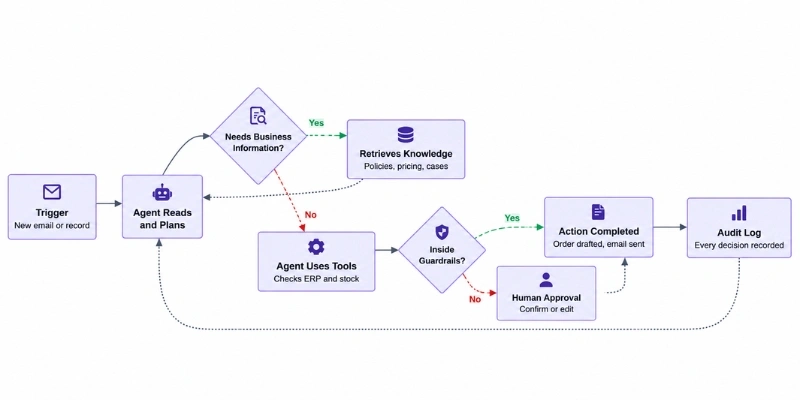
The important design principle is that the model should decide what it wants to do, while the surrounding application determines what it is actually allowed to do.
How to Build an AI Agent: Eight Practical Steps
This is the sequence we use on client projects. Follow it in order. Most failed agent projects skipped steps two or three.
Step 1: Pick one bounded workflow. One process, one team, one clear start and end. “Handle customer emails” is too broad. “Read incoming booking emails and prepare draft bookings for approval” is a project. If you cannot describe the workflow on one page, it is not ready.
Step 2: Write the success metric before anything else. Pick a number a manager already cares about: hours per week, cost per order, response time, error rate. Then write today’s baseline next to it. An agent without a baseline can never be proven to work.
Step 3: Map the systems and the permissions. List every system the agent must read from or write to, and how it connects. Decide now what the agent may do in each one. Read-only in finance, draft-only in the ERP, no sending without approval. This map becomes your tool list and your security model at the same time.
Step 4: Collect real examples. Gather 50 to 100 real cases, including the awkward ones: the supplier who writes in three languages, the PDF that is a photo, the customer who replies to an old thread. Agents look excellent on clean examples. Your business is not clean.
Step 5: Build a narrow prototype. Give the agent the smallest set of tools that can complete the task. Run it against your real examples with no ability to act yet. It proposes, you compare. This step usually takes two to three weeks and answers the only question that matters: is the reasoning good enough?
Step 6: Set guardrails and the approval line. Decide what it may do alone and what always needs a person. Add caps: maximum actions per run, maximum value per transaction, allowed recipients, allowed record types. Add a stop switch any manager can use.
Step 7: Pilot with humans in the loop. Go live with one team, with approval required on every action that changes something. Review the log weekly. You are looking for two things: how often the agent is right, and which exceptions it should escalate rather than attempt.
Step 8: Loosen limits slowly, then expand. After a month of clean logs, remove approval on the lowest risk action type only. Keep approval on everything else. Expand to a second workflow after the first one runs quietly for a full cycle.
There is nothing exotic in this list, and that is the point. The teams that succeed treat an agent as an operations change supported by AI and ML development, not as a software demo.
How to Build an AI Agent: SaaS, Low-Code, or Custom Development?
There are three sensible paths, and the right one depends on how much the agent must touch your own systems.
- Agent features inside tools you already own. Your CRM, helpdesk, or ERP may already offer agent features. Fastest to try, lowest cost, and limited to what that vendor exposes. Good for a first taste, weak when the work crosses several systems.
- Low-code agent platforms. Visual builders that connect to common applications. Quick to assemble, easy for a business team to adjust, and useful for straightforward workflows. Watch for per-run pricing at volume and limited control over how the agent reasons.
- Custom agent development. Built with agent frameworks against your own APIs, hosted on your own cloud. More effort up front, and the only realistic option when the agent must work across an ERP, a legacy database, and a document store, or when you need full control of security and cost.
| Factor | Vendor Agent | Low-Code Platform | Custom Development |
|---|---|---|---|
| Time to first pilot | 1 to 3 weeks | 3 to 6 weeks | 8 to 14 weeks |
| Typical build cost | Licence only | $8,000 to $30,000 | $35,000 to $150,000 |
| Systems it can reach | That vendor only | Common integrations | Anything with an API |
| Control over logic | Low | Medium | Full |
| Data and hosting control | Vendor decides | Mostly vendor | Yours |
| Running cost shape | Per seat or per action | Platform fee plus usage | Model usage plus hosting |
| Best for | Testing appetite | One clean workflow | Cross-system work, regulated data |
A practical middle path works well for many mid-sized companies: prove the value on a low-code platform, then rebuild the winning workflow properly when volume or integration needs outgrow it. If your core systems are older, budget for an integration layer first, because an agent cannot act on a system that offers no safe way in.
What It Costs and How to Model the Return
Agent costs come in two parts that behave very differently. The build is a one-time project cost. The running cost is metered and grows with usage, so it needs modelling before you commit.
| Cost Item | Typical Range | Notes |
|---|---|---|
| Discovery and workflow design | $2,000 to $8,000 | One to two weeks, includes the system and permission map |
| Prototype against real examples | $6,000 to $20,000 | The go or no-go step, worth every rupee or dollar |
| Production agent build, one workflow | $25,000 to $120,000 | Depends on how many systems it touches |
| Integration work on older systems | $10,000 to $60,000 | The most commonly underestimated line |
| Security review and guardrails | $3,000 to $15,000 | Includes permissions, logging, approval flows |
| Model usage, running | $150 to $3,000 per month | Scales with volume and how much context you send |
| Monitoring and support | 15 to 20 percent of build per year | Prompts, tools, and models all drift over time |
Now the number that decides everything: cost per completed task. Take the model cost of one agent run, add hosting and support spread across expected volume, and compare it to what the task costs today in salary time.
Work a simple example. Suppose a team handles 4,000 order emails a month at 6 minutes each. That is 400 hours. If an agent handles 70 percent end to end with a short approval step, you recover roughly 240 hours a month. Put your own fully loaded hourly cost against that and compare it to a $60,000 build plus around $800 a month in running costs. Depending on workflow volume, implementation cost, and operating savings, the payback period may be relatively short or considerably longer. If your own numbers do not show a reasonable return, do not start. Pick a higher-volume workflow instead.
Three things quietly inflate running costs, and all three are fixable in design:
- Sending too much context. Trimming retrieved documents and prompt history often cuts model spend by a third or more.
- Using the strongest model for every step. Simple classification does not need your most expensive model. Route the easy steps to a smaller one.
- No caching. Repeated lookups should never hit the model twice.


Security, Permissions and Governance
An agent is not a chatbot with extra features. It is a new user in your systems that never sleeps and acts faster than any person. Treat it that way from day one.
Least privilege, always. Give the agent its own service account with the narrowest access that lets it work. Read-only wherever writing is not required. Never reuse an admin account because it was convenient during testing.
Action limits. Cap what one run can do: number of records, transaction value, number of emails, allowed recipients. A retry bug with no cap is how a quiet Tuesday becomes an incident.
Approval thresholds. Write down which actions always need a person. Value above a limit, anything customer-facing, anything irreversible. Start strict.
Full audit logging. Every input, every decision, every action, with timestamps and the agent version. This is what lets you debug a bad week, and what an enterprise customer or auditor will ask to see.
Prompt injection defence. If your agent reads emails, documents, or web content, assume someone will hide instructions inside them. Keep system instructions separate from incoming content, never let retrieved text grant new permissions, and treat model output as untrusted input before it reaches a tool.
Data boundaries. Understand the model provider’s data retention, training, logging, and residency policies, and verify the contractual controls that apply to your organization’s data.
A stop switch and a rollback plan. One person should be able to stop the agent instantly, and you should know how to reverse a batch of wrong actions.
You do not need a large committee for governance. You need a named owner, a weekly log review, and written limits. We covered the deeper technical side in our guide to secure enterprise AI agents.
One more point that gets missed. Agents need testing that ordinary software does not, because the same input can produce different steps. Build an evaluation set of real cases and re-run it every time you change a prompt, a tool, or a model.
Why Agent Projects Fail
Plenty of agent projects get cancelled, and the reasons are consistent: costs climb, value stays vague, and nobody owns the risk controls. The pattern behind the cancellations looks like this.
| Mistake | What Goes Wrong | The Fix |
|---|---|---|
| Starting with a broad, vague goal | The agent is judged on everything and good at nothing | One workflow, one metric, one team |
| No baseline measurement | Nobody can prove value at budget time | Record today’s hours and error rate first |
| Agent built on messy data | Confident answers based on wrong records | Fix the source data or pick another workflow |
| Permissions too wide | Small bug, large blast radius | Least privilege plus action caps from day one |
| No human checkpoint early | One bad batch destroys trust for a year | Approve everything at first, loosen with evidence |
| Ignoring exceptions | Staff quietly go back to the old way | Design the escalation path before go-live |
| Treating it as an IT project | No process owner, no adoption | Name a business owner who reviews logs weekly |
| No evaluation set | Every change is a gamble | Re-run real cases after every change |
Scale is the other honest constraint. McKinsey’s State of AI research found that while 88 percent of organizations use AI somewhere, no more than about 10 percent report scaling AI agents in any single function. Adoption is easy. Scaling is the hard part, and it is won through logs, guardrails, and process ownership rather than model choice.
Lessons from Atharva System Engagements
Here is what this work looks like in practice, from our own delivery. Details are anonymized and outcome figures are rounded.
Logistics, order and booking intake. The initial request was a customer-facing chatbot for booking status. During discovery we found the expensive problem was upstream: coordinators manually reading and re-keying booking emails. We built an intake agent that reads the email, matches customer and rate records, prepares the draft booking, and routes anything unusual to a person with the reasoning attached. Around two thirds of routine bookings now arrive pre-filled for a quick approval. The chatbot was built later, on cleaner data, and took a fraction of the original estimate.
Manufacturing, procurement follow-up. A client wanted an agent to place purchase orders automatically. We deliberately narrowed it. Version one only drafted the purchase order and requested approval above a value threshold, with full logging. After six weeks of clean logs, the client removed approval for low-value repeat orders from approved vendors only. Buyer time dropped noticeably, and no unwanted order has been placed, because the limits were written before the code.
Finance, receivables follow-up. We connected an agent to the ERP with read access to invoices and draft-only access to communication. It watches overdue accounts, sends scheduled reminders, answers simple statement queries, and escalates disputes to a human with the account history summarized. The interesting result was not the hours saved, it was the consistency: reminders now go out on schedule during busy periods, when they used to slip.
Healthcare, internal knowledge. We evaluated several agent ideas with a healthcare client and recommended against the two most requested ones for compliance reasons. We started with internal policy and documentation lookups for staff, with no patient data in scope, and used that project to build the review board, logging, and consent framework. That foundation is what makes the more sensitive phases approvable later.
The pattern is the same each time. Narrow the scope, keep a person in the loop, log everything, and expand only on evidence. You can see more in our client work.
Your First 90 Days
If you want a plan you can put in front of a leadership team on Monday, use this one.
| Weeks | Focus | Key Activities | What You Have at the End |
|---|---|---|---|
| 1 to 2 | Choose and measure | Shortlist workflows, pick one, record the baseline, name a business owner | A one page workflow definition with a target number |
| 3 to 4 | Map and design | System and permission map, tool list, guardrails, approval thresholds | An architecture and a written security model |
| 5 to 7 | Prototype | Build narrow, run against 50 to 100 real cases, no live actions yet | Evidence of whether the reasoning is good enough |
| 8 to 10 | Build for production | Tools wired properly, logging, approval flow, evaluation set, security review | A working agent behind human approval |
| 11 to 12 | Pilot with one team | Daily use, weekly log review, fix escalation gaps, train the team | Real usage data and an honest accuracy picture |
| 13 | Decide | Compare against the baseline, then loosen limits, expand, or stop | A funded decision based on numbers, not opinion |
The week 13 decision point is the most valuable line in the table. Give the project a real chance to be stopped. Teams that cannot stop a project also cannot learn from it.
Readiness Checklist
Confirm every item before you commission an agent build.
- One workflow is chosen, and it fits on a single page
- The current baseline is measured: hours, volume, error rate, or response time
- A named business owner will review agent logs weekly
- Every system the agent must touch has an API or another safe way in
- The data the agent will rely on is accurate enough to act on
- Permissions are decided per system: read, draft, or act
- Approval thresholds are written down before development starts
- Action caps and a stop switch are in the scope
- 50 to 100 real examples, including awkward ones, are collected
- An evaluation set exists and will be re-run after every change
- Model usage cost per task has been estimated and compared to the manual cost
- The escalation path for exceptions is designed, not assumed
- Success and stop criteria for the pilot are agreed in writing
Conclusion
The companies getting value from agents are not the ones with the most advanced models. They are the ones that chose a boring, high volume workflow, measured it honestly, gave the agent narrow permissions, kept a person in the approval seat, and read the logs every week. That is the whole method. If you want to build an AI agent that survives its first quarter, resist the urge to start with something impressive, and start with something measurable. The second agent is much easier to fund than the first, and it is the first one’s evidence that pays for it.
Get Your AI Agent Scoping Session
Atharva System designs and builds production AI agents that work inside real business systems, with the permissions, logging, and approval flows that make them safe to run. Our agentic AI team handles strategy and delivery together, so one partner owns the outcome.
Bring us one workflow that eats your team’s week. We will map the systems and permissions it would need, tell you honestly whether an agent is the right answer, define the guardrails and approval points, and give you a scope, architecture, timeline, and cost range before you commit to development. Book your scoping session today.
FAQs
1. What is an AI agent in business terms?
An AI agent is software that is given a goal and the ability to act. It reads real inputs like emails or documents, decides the steps, uses your systems through controlled permissions, and reports what it did. Unlike a chatbot, it changes something in your business.
2. How much does it cost to build an AI agent?
A production agent for one workflow typically costs between $25,000 and $120,000 to build, depending on how many systems it touches, plus roughly $150 to $3,000 a month in model usage and 15 to 20 percent of the build cost per year for support. Low-code builds start lower, around $8,000 to $30,000.
3. How long does AI agent development take?
A narrowly scoped custom agent can often reach a production pilot in roughly 8–14 weeks, depending on integration, security, evaluation, and workflow complexity. Low-code approaches may reach a pilot sooner when the workflow and integrations are relatively straightforward. An early prototype and evaluation phase helps determine whether the agent is reliable enough to continue toward production.
4. What is the difference between an AI agent and a chatbot?
A chatbot answers questions. An agent completes work across systems. If your requirement is “tell people something”, build a chatbot. If it is “do this task”, build an agent.
5. Which processes should I automate with an AI agent first?
Start with high volume work where a person copies information between systems: order intake, invoice follow-up, ticket triage, procurement drafting, and CRM updates. Avoid anything where a mistake is expensive and hard to reverse.
6. How do I keep an AI agent secure?
Give it a dedicated account with least privilege, cap what one run can do, require human approval on important actions, log every step, defend against prompt injection in any content it reads, and confirm your data is not used for model training.
7. Can AI agents work with our ERP or legacy systems?
Usually yes, if there is an API or another safe integration route. Modern platforms like Odoo are straightforward. Older systems may need an integration layer built first, which should be scoped as its own line in the budget.