One of the most important tech trends of a previous couple of years has been the shift to cloud computing (data processing). Once companies used to win their data centers.
These data centers are set to deflate about 32% of all the enterprise applications by the year 2022, which is roughly half of 2019.
What is a Cloud?
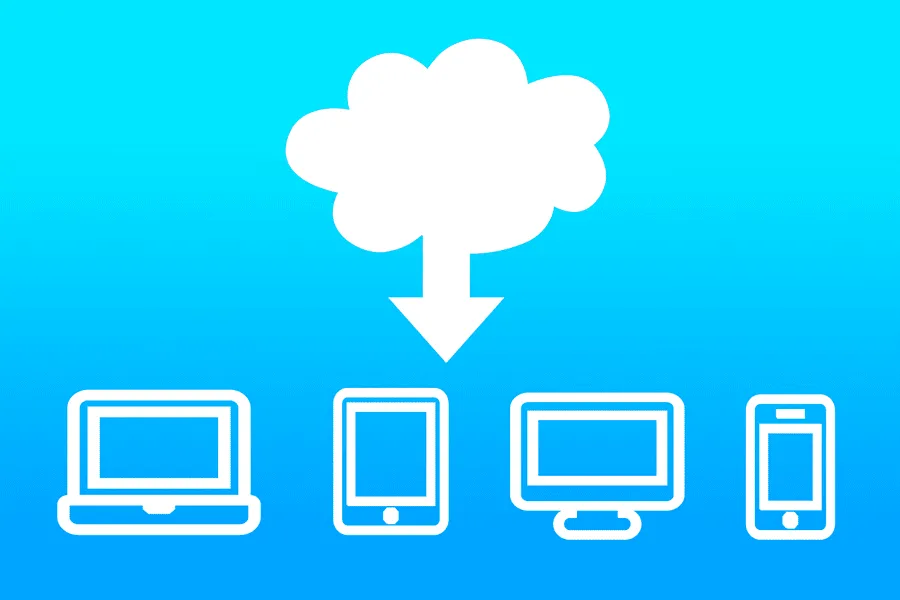
The data center lets users control the same files and apps from almost any other device as all the computing and storage is held on servers in a data center, instead of the user’s device.
This is the reason why a user can sign into their Facebook account on a different phone once their old phone breaks.
They somehow still can find their old account aligned, with all their conversations, videos, and photos.
It operates similarly with other cloud email providers such as Gmail or Microsoft Office 365, and also with data storage providers such as Dropbox or even Google Drive.
For businesses, changing to cloud computing eliminates some of the IT costs: for example, they won’t update and manage their servers, because the cloud vendor would do that for them.
Cloud Computing is quite magnificent for those small businesses that can’t afford their infrastructure, however, can easily outsource their infrastructure needs through the cloud.
For employees and customers connecting internationally, the online data is like a life-saver as they will be able to access information from any location or device they want to.
How does Cloud Computing Work?
It is within our eyes now due to a technology known as virtualization. It creates a simulated, digitally virtual computer that reacts like a physical computer that has its hardware.
The virtual machine is the technical term for such a computer. If perfectly integrated, virtual machines are isolated from one another on the same host machine, hence, they cannot interact with each other.
Also, the files are not visible from one virtual machine to the other although both of them are on the same machine.
Virtual machines also take advantage of the hardware hosting them and make them more efficient.
By operating several virtual machines, a single server becomes multiple servers, and a single data center can operate as a whole host of data centers. This in turn can serve multiple organizations.
Hence, cloud providers can provide their servers to a multitude of customers at a time and can do so at a low cost too.
Even when individual servers would be out of commission, online servers usually will always be online and available. Online data center vendors usually back their services upon several machines and towards different regions.
Users gain access to online data services either via browser or an app, joining the data over the Internet by many different interconnected networks despite the device they’re using.
Cloud Infrastructure Requirements are changing
This, in no way, means that public data are going somewhere. They’re supposed to grow potentially. A recent IDC study has shown that public online data expenditure will increase twofold by 2023.
Hence, lift and shift techniques that transfer assets into data applications are starting to become more mainstream than ever.
Although, regardless of this cloud computing trends, a considerable amount of companies were performing repatriation, or transferring some data and analyzing workloads through a public environment to a more private one.
Another study proves that by the year 2017, that transition was chosen by more than a third of companies. This included 36% of cloud-based organizations generating their computing platform in a private cloud.
Dropbox is the most prominent example of this kind of repatriation. It is the famous storage service that started from Amazon Web Services (AWS).
Dropbox simmered down its expenses by $74.6 million in the past two years since they repatriated the majority of their operations offering colocation services from public data to data centers.
Reasons why Companies are Flocking to Online Data Centers
1. Flexibility
- Businesses with fluctuating or growing bandwidth demands will always choose cloud computing services. It is quite easier to increase your cloud capacity if your needs increase.
- This flexibility also kicks in if you ever want to scale down again. This is the kind of cloud computing that would put companies at some advantage over their competitors. Better to hire cloud developer to get it done.
2. Managed Infrastructure and Automatic Updates
Cloud providers manage infrastructure maintenance, operating system updates, security patches, and platform upgrades automatically. This reduces the burden on internal IT teams and allows businesses to focus more on innovation and core operations instead of infrastructure management.
3. Capital-Expenditure Free (Opex vs Capex)
Cloud computing reduces the need for significant upfront investments in hardware and data centers. Businesses can scale resources on demand and pay only for the services they use, making IT spending more predictable and easier to manage. However, organizations should also monitor cloud usage to optimize long-term operational costs.
4. Low-Cost Disaster Recovery
- All sizes of businesses must invest in robust disaster recovery, however, for businesses lacking the much-needed cash and expertise, this is just thought instead of reality.
- More and more organizations are now able to get on the bandwagon due to cloud computing.
5. Competitiveness
- If you wish to become more competitive in your field then migrating to the online server will offer you access to enterprise-level technology. Smaller businesses can act faster than bigger and more established competitors.
- Online data business apps and pay-as-you-go can help small businesses to stand head to head against the industrial giants and disturb the market.
6. Work from Anywhere
- If you have an internet connection then with online data computing you can be at work. Due to these services providing mobile apps, you are not limited by whichever device you have with you.
7. Security
Leading cloud providers offer advanced security capabilities such as data encryption, identity and access management (IAM), multi-factor authentication (MFA), continuous monitoring, and compliance certifications. While cloud providers secure the infrastructure, businesses should also implement strong security policies and access controls to protect their applications and data.
8. Document Control
- The higher the need for watertight document restriction, the more employees and partners there are to collaborate on documents.
- Employees, before the cloud, had to transfer files back and forth through email attachments to get worked on a user at a time.
- Also, in no time, there will be a mess of confusing file formats, titles, and content on your hard drive.
- Complications keep on rising when even the smallest companies tend to become more globally acclaimed.
- Research shows that 73% of knowledge workers join hands with people internationally living in different time zones and places monthly.
- All this chaos can be avoided when you move to cloud computing where you can store all your files at the center.
- Increased vision means enhanced collaboration that means a healthier and better work environment. If you are still old school, it might be time to change gears.
Cloud-based document management also supports version control, role-based access, audit logs, and real-time collaboration, helping teams work more efficiently while maintaining data security and compliance.
9. Increased Collaboration
- Your teams can do more together by accessing, editing, and sharing documents anytime from anywhere.
- File-sharing apps as well as cloud-based workflow provide them complete visibility in their collaborations and support them in making updates in real-time.
10. Eco-friendly
- Even though there might be so many reasons why moving to the cloud can enhance the functionality of your business, the environment benefits a lot from it as well.
- Your server capability goes up and down when your cloud needs to change. Modern cloud providers continuously optimize energy consumption through highly efficient data centers and renewable energy initiatives. By using cloud resources on demand, businesses can reduce unnecessary infrastructure usage while supporting their sustainability goals.
Synopsis
Cloud is a booming market especially in this pandemic. Given its unlimited benefits, it is quite clear why businesses are flocking towards this technology.
If you haven’t decided on it yet, hire a cloud developer to know the facts and how to make the best out of this technology.
Frequently Asked Questions
What is cloud computing in simple terms?
Cloud computing allows businesses to access computing resources such as servers, storage, and software over the internet instead of maintaining physical infrastructure.
Why are businesses moving to cloud computing?
Businesses adopt cloud computing to improve scalability, reduce infrastructure costs, strengthen security, support remote work, and accelerate digital transformation.
Is cloud computing secure?
Yes. Leading cloud providers offer advanced security features, but organizations must also follow best practices for identity management, encryption, and access control.
What is the difference between public, private, and hybrid cloud?
Public cloud is shared infrastructure, private cloud is dedicated to a single organization, and hybrid cloud combines both for greater flexibility.
Can small businesses benefit from cloud computing?
Yes. Cloud computing enables small businesses to access enterprise-grade technology without significant upfront infrastructure investments.
How do I migrate my business to the cloud?
Start by assessing your applications, selecting the right cloud strategy, planning data migration, and partnering with an experienced cloud migration provider.